Internal Linking in HTML: The Developer's Guide to Crawlable Links
A developer's guide to the HTML contract behind internal links: anchors, URL forms, crawler behavior, auditing, and fixing orphaned pages.
You ship a new feature page, link it from the release announcement, and move on. Weeks later, it has no organic traffic. The page loads, its title is correct, and the XML sitemap lists it. A quick check shows the problem: no crawlable page on the site links to it, and the navigation that should expose it only appears after a JavaScript interaction.
That's an HTML contract problem before it's an SEO tactic. Internal links define how users move through a document, but they also form the graph crawlers use to discover URLs and interpret which pages matter. Google says crawlable links generally use an HTML <a> element with an href, and links can help Google discover new URLs (Google's crawlable links documentation). The WHATWG HTML Standard treats links as a core browser feature and documents the fragment mechanism behind in-page navigation (WHATWG links).
This guide follows the fix path developers can ship: understand the anchor element, choose URL forms deliberately, inspect rendered HTML, audit inbound links, set a useful link volume, and remove template patterns that create orphans.
The Internal Linking Problem You Have Not Noticed Yet
The page looked healthy in the repository. It had a route, metadata, a sitemap entry, and a polished component. The developer who shipped it could reach it through the product navigation after the app hydrated. A crawler fetching the initial HTML could not.
The URL sat several clicks below the main product area, with no contextual reference from documentation, blog content, or related feature pages. In the rendered HTML captured before the client-side interaction, the only apparent path was a script-driven menu. From a user's perspective, the page existed. From the site's crawl graph, it was close to isolated.
That distinction matters on small SaaS sites because a sitemap is not a substitute for a usable internal architecture. Google describes crawl budget as the allocation of crawling resources per site, and its guidance supports reducing unnecessary discovery paths so important URLs can be found and revisited efficiently (Google's crawl budget documentation). Pages with few incoming internal links are harder to reach consistently, especially when the only reference is temporary, conditional, or generated after interaction.
The graph behind the page
An internal link does several jobs at once:
- Discovery: It gives a crawler a path from an already known page to another URL.
- Priority signaling: Repeated, relevant references can show which pages your site considers useful.
- Context: Descriptive anchor text connects the destination to the subject of the surrounding content.
- Navigation: It gives a person a clear next step without requiring a search box or a remembered URL.
The underlying HTML mechanism is ordinary. A page section receives an id, and an anchor points to it with href="#that-id". The same document-navigation model supports table-of-contents links, jump links, and accessibility patterns, so internal linking isn't a niche SEO trick layered on top of HTML. It uses a browser contract that has been standard for mainstream web authoring for decades (WHATWG's links chapter).
Large-scale data shows why underlinking deserves attention. A study covering 23 million internal links across 1,800 websites and about 520,000 URLs found that pages with 40 to 44 incoming internal links averaged about 4x the Google clicks of pages with 0 to 4 incoming internal links (Zyppy internal linking study). The result is a site-level correlation, not a publishing target. It tells you to inspect the distribution, not to add links mechanically.
Practical rule: Treat every important route as a dependency in your site architecture. If no crawlable HTML reference points to it, the route is not integrated, regardless of whether the application can render it after JavaScript runs.
Anatomy of an HTML Link
Start with the smallest valid link. Save this as a static HTML file and open it locally:
<a href="/docs/api">Read the API documentation</a>
The <a> element creates the link, href supplies its destination, and the text between the opening and closing tags is the anchor text. MDN recommends that the content inside an anchor indicate where the link goes, and notes that href can point to a location in the same page or to another URL (MDN anchor element reference).
Several attributes change behavior without replacing the basic contract:
<a
  href="/downloads/sdk.zip"
  download
  title="Download the SDK"
  aria-label="Download the API SDK"
>
  SDK download
</a>
rel describes the relationship between the current page and the destination. target="_blank" asks the browser to open a new browsing context. title can provide supplemental information, but it shouldn't carry essential meaning that appears nowhere else. download suggests downloading a resource, subject to browser and server behavior. aria-label can provide an accessible name when the visible content isn't sufficient, though descriptive visible text is usually the clearer default.
What still counts as an anchor
Anchors can wrap more than plain text:
<a href="/pricing">
  <div class="card">
    <h2>Pricing</h2>
    <p>Compare plans and included features.</p>
  </div>
</a>
The linked content is the complete element subtree. That can be useful for cards, but it creates a larger clickable area and can make anchor interpretation less precise if the card contains unrelated text.
These constructs fail in different ways:
<a href=""></a>
<a onclick="openDocs()">Documentation</a>
<a>Documentation</a>
The first has an empty destination. The second depends on a click handler and has no normal URL fallback. The third lacks href, so it's not a crawlable link. A <button> can be the right control for an application action, but it isn't a replacement for a navigational anchor.
Fragment identifiers and silent failures
For in-page navigation, give the destination a unique id:
<a href="#authentication">Jump to authentication</a>

<h2 id="authentication">Authentication</h2>
The browser scrolls to the matching element without a full page reload. A fragment with no matching id fails to reach its intended destination. IDs must be unique within the document, and fragment matching is case-sensitive, so #Section1 doesn't match id="section1" (HTML 4.01 link specification).
Inspect the output, not the component
A React component may contain a link in source code while the initial response contains only a root <div>. Compare the two:
<!-- View Source or curl output -->
<div id="app"></div>
<!-- Rendered DOM after hydration -->
<div id="app">
  <a href="/docs/api">Read the API documentation</a>
</div>
The second is what a browser sees after execution. Whether a crawler receives it depends on rendering and timing. Check the actual response and the rendered output. If a critical route appears only in a JavaScript event handler, you haven't shipped a dependable internal link.
Choosing the Right URL Form for Internal Links
URL syntax determines how an href resolves from its base URL. Consider the same page, `
A root-relative link starts at the domain root:
<a href="/docs/api">API documentation</a>
It resolves to whether it appears on the homepage or under/blog/post-1/`. A document-relative link starts from the current path:
<a href="../products/widget.html">Widget</a>
From /blog/post-1/, it resolves through the parent directory. Move the page to /blog/archive/post-1/, and the same string resolves somewhere else. That's the maintenance risk of directory-relative paths.
An absolute URL includes the scheme and host:
<a href="https://example.com/products/widget">Widget</a>
It's explicit and useful for generated feeds, canonical values, and cross-domain references. It also repeats the host throughout templates and can preserve an outdated hostname if environments or migrations change.
Three forms, one decision
The root-relative form is usually the safest default for same-domain navigation in templates. Document-relative paths can be compact in tightly controlled static directories, but they're fragile when routes move. Absolute URLs are appropriate when the destination must be unambiguous outside the page context, such as a canonical URL, a generated sitemap, or a cross-domain destination.
Watch the trailing slash. A base ending in / behaves like a directory, while a base without it is treated like a document during relative resolution. A server redirect policy can then turn one apparent path into another. A <base href> element can also change how every relative URL on the page resolves, so inspect it before debugging a link that looks correct in a component.
| Context | Recommended Form | Example | Failure If Misused |
|---|---|---|---|
| Same-domain template navigation | Root-relative | /docs/api |
Document-relative paths can break after a route move |
| Static content in a fixed directory | Document-relative | ../products/widget.html |
The parent calculation changes when directories change |
| Canonical markup | Absolute | https://example.com/products/widget |
A relative value can be invalid or ambiguous in generated metadata |
| Cross-domain destination | Absolute | ` | A root-relative path points to the wrong host |
| Generated sitemap | Absolute | ` | Relative values don't identify a complete sitemap URL |
| Same-page jump link | Fragment | #authentication |
Missing or mismatched id leaves the jump broken |
The same discipline applies when a page participates in a Backlink Campaign. Keep the destination URL form consistent with the canonical URL and server redirect policy instead of mixing path styles across generated content.
How Crawlers Actually Read Your Links
A crawler starts with a fetched document, extracts URLs from crawlable constructs, and adds eligible destinations to a crawl queue. The exact implementation is more complex than that summary, but the engineering implication is straightforward: the link must exist in crawler-facing HTML.
Google specifically identifies an HTML <a> element with an href as the reliable pattern for crawlability (Google's crawlable links documentation). This rules out several patterns developers commonly ship:
<div onclick="location.href='/docs/api'">API docs</div>
<a onclick="openDocs()">API docs</a>
<a href="javascript:openDocs()">API docs</a>
Use this instead:
<a href="/docs/api">API docs</a>
A JavaScript enhancement can still add behavior, but the anchor should work without it. Hash-based routers deserve the same review. A URL such as /app#/settings can help application navigation, but the fragment identifies a state within the current document. It doesn't provide the same crawlable destination model as a normal path like /settings, and fragments are generally stripped before indexing as separate URLs.
Internal rel values
Internal links normally work without a rel attribute. If you add nofollow, you're telling Google not to follow that link for discovery and signals. sponsored and ugc describe paid or user-generated relationships, but they shouldn't be attached casually to ordinary site navigation. A rel value doesn't repair a missing href, and it doesn't turn a click handler into a crawlable anchor.
| Link Construct | Crawler Behavior | Transfers Internal Signals? |
|---|---|---|
<a href="/docs/api">Docs</a> |
Standard crawlable link | Generally eligible for discovery and internal signals |
<a onclick="openDocs()">Docs</a> |
No dependable URL extraction | No dependable destination signal |
<div onclick="location.href='/docs/api'">Docs</div> |
Not a standard anchor | No dependable anchor signal |
<a href="javascript:openDocs()">Docs</a> |
JavaScript protocol, not a normal URL | Not a reliable internal link |
<a href="/docs/api" rel="nofollow">Docs</a> |
Destination may be excluded from following | Signals are restricted according to the directive |
<a href="#authentication">Authentication</a> |
In-page jump within the document | Does not create a separate indexed page |
Use Google Search Console's URL Inspection tool to inspect the indexed URL and its rendered output. For a developer-side check, compare three artifacts:
- View Source: Confirm the server response includes
<a href="...">. curlresponse: Fetch the production URL and grep the returned HTML for the destination.- Headless render: Confirm hydration doesn't remove, rewrite, or hide the anchor.
A page about SEO for developers is only useful as an internal destination if the link pointing to it survives that inspection. The same check applies before evaluating a separate workflow such as Orchory AI Brand Visibility, because the HTML contract still comes first.
Auditing Internal Links on a Real Site

A crawl can report healthy URLs while the rendered page exposes no usable anchor. Audit the HTML contract first, then evaluate how the links support site architecture.
Start by separating Internal HTML URLs from images, scripts, stylesheets, and external resources. In Screaming Frog, crawl the site, open the Internal tab, filter the type to HTML, and export fields for the URL, status code, indexability, crawl depth, and internal inlink count.
Sort by Internal Link Count ascending. A URL with zero incoming links from crawlable HTML is an orphan in that crawl, even if it appears in a sitemap or exists behind an application state. One or two inlinks is not automatically a defect, but it warrants a relevance and depth review.
After exporting, group candidates by status, indexability, and template. For a broader prioritization framework, see this internal linking strategy guide before deciding which pages to fix first. Google Search Console's Links report adds another view. Compare its top internally linked pages with product priorities. If utility, repeated navigation, or legal URLs dominate while core feature pages receive little contextual support, the template is carrying more weight than the content.
Search for invalid constructs
A shell check exposes obvious failures in saved HTML:
grep -Eo 'href="(javascript:|)"|onclick="[^"]+"' page.html
Run it against representative rendered output, not only source components. For a site-wide check, search downloaded HTML files or use a crawler custom extraction. Inspect every match manually, since framework serialization can differ from the source template.
Use filters to find:
- Too few inbound links: Internal Link Count equals
0, then1or2. - Deep pages: Crawl Depth exceeds the level users can reasonably reach.
- Excessive outbound links: Internal Outlinks exceed the content template's normal range.
- Broken destinations: Status codes in the
4xxrange. - Redirected destinations:
3xxlinks that should target the final URL directly.
Open each candidate and inspect the rendered anchor. Confirm the href, visible text, destination response, and whether hydration removes or rewrites the element. The crawl is useful only when the received HTML matches the architecture you intended.
For a final visual check, disable JavaScript in a browser and test key navigation. If a client-side-only menu disappears, add server-rendered or pre-rendered anchors where that navigation matters.
<iframe width="100%" style="aspect-ratio: 16 / 9;" src="https://www.youtube.com/embed/VGEw3nvWlPo" frameborder="0" allow="autoplay; encrypted-media" allowfullscreen></iframe>How Many Internal Links Are Enough
There isn't a useful universal target. The right number depends on the page's purpose, the amount of content, the number of genuine next steps, and how much repeated template navigation surrounds the main copy.
A practical ceiling helps prevent accidental bloat. Treat 100 to 150 links per page as a soft ceiling for crawl budget and user attention, not as a ranking rule. The range is an engineering guardrail for content pages. A documentation index or large application directory may need more, while a focused feature page may need far fewer.
Calculate the average internal inbound links per indexable page from your crawl:
total internal inbound links ÷ number of indexable HTML pages
That average can hide a bad distribution. A site may have a reasonable mean while many pages sit at one or two inlinks and a small set of templates receives nearly everything. The large-scale Zyppy dataset found that 66.2% of web pages had only one internal link pointing to them (Zyppy internal linking study). That's a useful warning about long tails, not a prescription to give every URL dozens of links.
Use relevance before volume
Link from pages that already attract organic visits or serve as strong entry points, when the destination extends the reader's task. A relevant contextual link from a product comparison page to a feature explanation is usually more useful than another identical footer link from every page.
Vary anchor text naturally. The words should describe the destination, but repeating one exact phrase in every context makes the content awkward and can obscure distinctions between related pages. Use the page's actual subject, such as "API authentication guide," "webhook retry behavior," or "integration setup," rather than a generic "learn more."
| Scenario | Effect of Adding More Links | Practical Guideline |
|---|---|---|
| An important page has no contextual inlinks | Improves discovery and context | Add a relevant link from an established page |
| A page receives one or two weak template links | May add little useful context | Add a body link only where it helps the reader |
| A content page approaches the soft ceiling | Increases scanning cost and can dilute attention | Remove redundant links before adding more |
| Many pages repeat the same footer destinations | Expands the graph without adding topic relevance | Keep essential utility links, trim link farms |
| A hub page connects related supporting pages | Clarifies topical relationships | Link to the most useful adjacent pages, not every URL |
| A low-value page links to every product page | Creates noise and weakens intent | Choose destinations that match the page's subject |
The question isn't "How many links can this template hold?" It's "Which links shorten the user's path and clarify the site's structure?"
Common Internal Linking Mistakes in HTML
The default advice to "add more internal links" fails when the shipped markup already contains too many low-value links or no dependable anchors at all.
Repeated navigation and footer farms
A global menu copied into every page can dominate the internal-link graph with identical anchors. A footer containing every category, article, and feature creates the same problem. The rendered signal is easy to find:
<footer>
  <a href="/feature-a">Feature A</a>
  <a href="/feature-b">Feature B</a>
  <a href="/feature-c">Feature C</a>
  <!-- dozens of repeated destinations -->
</footer>
Keep navigation useful and put contextual links in the body where their relationship is clear. Search rendered HTML for repeated destination URLs across templates, then compare those counts with meaningful content inlinks.
JavaScript-only navigation
This pattern looks interactive but has no URL contract:
<span onclick="router.push('/docs/api')">API docs</span>
Replace it with an anchor and enhance it if needed:
<a href="/docs/api" onclick="prefetchDocs(event)">API docs</a>
Grep rendered files for onclick=, javascript:, and navigation calls without adjacent href attributes. Check the server response as well, because a component can contain a correct anchor that never reaches the initial document.
Path inconsistency and stale routes
Mixing /docs/api and /docs/api/ can create redirecting or duplicate crawl paths if server configuration treats them differently. Renaming /features/reports to /features/analytics without updating internal references creates 404 links or chains through multiple redirects. Filter crawl exports for 4xx and 3xx, then replace internal links with the final canonical destination.
The soft ceiling of 100 to 150 links per content page is a useful warning line, not a hard exception-free limit. When a page exceeds it, inspect repeated templates first.
| Mistake | Rendered-HTML Signal | Fix |
|---|---|---|
| Link farm footer | Large repeated destination set in every page | Keep utility links and remove redundant collections |
| JavaScript-only nav | onclick or router calls without <a href> |
Add a normal anchor fallback |
| Empty anchor | href="" or missing link text |
Supply a valid destination and descriptive text |
| Inconsistent slash form | Links resolve through redirects or duplicate paths | Standardize the linked URL form |
| Renamed slug | Internal links return 4xx or chain through 3xx |
Update references and maintain a redirect map |
| Template overlinking | Excessive repeated internal outlinks | Remove low-value links and preserve relevant paths |
Accidental nofollow |
Internal anchors contain rel="nofollow" |
Remove it unless the restriction is deliberate |
A Simple Maintenance Routine for Internal Links
A founder or solo developer can run this monthly with a saved crawl configuration and a short spreadsheet review.
- Export a crawl. Use Screaming Frog or Sitebulb, then save the Internal HTML export. Keep URL, status code, crawl depth, canonical, indexability, internal inlinks, and internal outlinks columns.
- Filter errors. Isolate
4xxURLs and3xxURLs. Replace links to redirects with the final destination, and repair or remove links to missing pages. - Find weak pages. Sort internal inbound links ascending. Open every zero-inlink URL and decide whether it should be linked from relevant content, removed, redirected, or intentionally excluded.
- Review new content. Compare the last month's pages with existing anchors and related destinations. Add links from established pages where the new page answers a genuine next question.
- Check rendered navigation. Fetch representative URLs with
curl, then use a headless browser for hydrated routes. Confirm important anchors exist in the response or reliable rendered output. - Compare canonicals. Check the canonical column against the URL form used in internal links. Change internal links that point to avoidable redirect or alternate URL variants.
- Review the sitemap. Confirm pages linked during the last month are included when they're intended for discovery and indexation. A sitemap should support the architecture, not compensate for missing internal references.
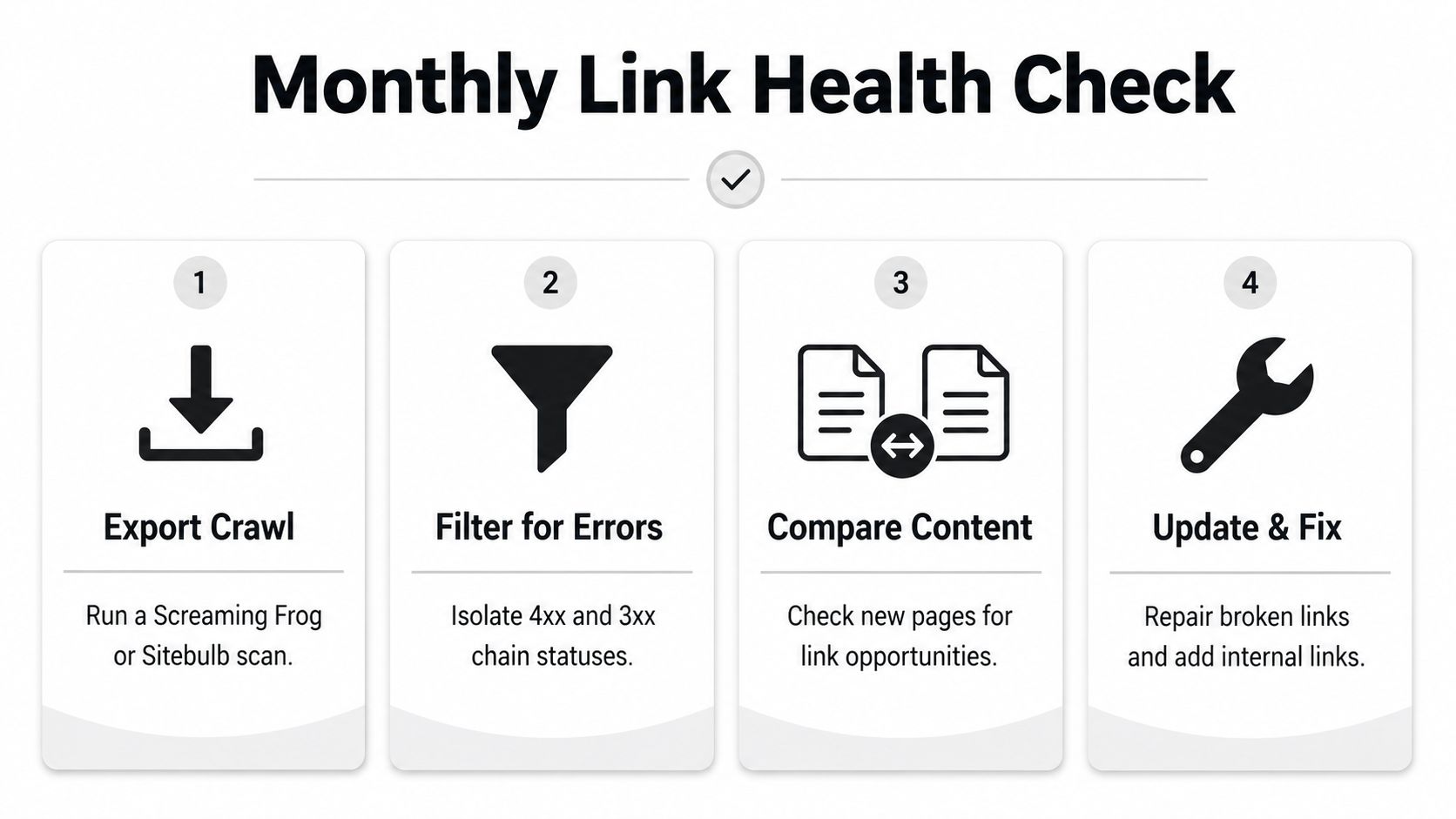
Keep one artifact from each run: the crawl CSV, the filtered error view, and a short list of changed links. That turns maintenance into shipped work rather than a recurring report nobody acts on.
If a page has zero internal links pointing to it and isn't in the sitemap, treat it as broken until proven otherwise.
Orchory helps SaaS teams plan search growth through keyword research, topic clustering, opportunity scoring, and ready-to-run prompts for coding agents that can open pull requests. Visit Orchory to connect content opportunities with the implementation workflow, then review and merge the internal-link changes your team chooses to ship.
FAQs
Why does a page with a correct sitemap entry still get no organic traffic?
What makes a link 'crawlable' according to Google?
Which URL form should I use for internal links: root-relative, document-relative, or absolute?
How many internal links should a page have?
Does adding rel='nofollow' fix a broken internal link?
How do I audit internal links on an existing site?